How to record a DJ set on your phone
You can record a DJ set on your phone in full, lossless quality without a laptop, as long as the sound reaches the phone as a digital signal over USB, not through a cable into its headset or microphone input. There are three ways to do it: straight from a mixer that has USB audio built in, from the mixer's REC or booth output through a small USB audio interface, or on a standalone recorder instead of the phone.
Why not plug the mixer into the phone's headset jack?
Running a cable from the mixer's REC output into the phone's headset socket, or into a USB-C headset adapter, looks like the simple option. The result is usually disappointing:
- It's mono. A phone's headset input carries one microphone channel, so the stereo mix is folded into one.
- It's built for a microphone. A mixer's line output is many times louder than a microphone, so it distorts the input unless the cable has an attenuator to bring the level down, and that adds noise.
- The phone treats it as voice. Recording apps on many phones apply automatic gain and voice processing to that input, which pumps the level up and down with the music.
- Many phones have no jack at all. And the USB-C adapters that replace it inherit the same mono microphone input.
USB avoids all of this: the mixer, or an audio interface connected to its REC output, sends the full stereo mix to the phone as digital audio, at the level you set.
The three ways at a glance
| What you need | Quality | Best for | |
|---|---|---|---|
| 1. Mixer USB → phone | A mixer with USB audio, a USB cable | Lossless, digital all the way | Mixers with a built-in sound card |
| 2. REC out → interface → phone | Any mixer, a small USB audio interface, two cables | Lossless after one conversion | Any mixer, including club mixers without USB |
| 3. Standalone recorder | A portable recorder with a line input | As good as the recorder | Not using the phone at all |
Way 1: straight from the mixer's USB
Many DJ mixers made for use with a laptop have a sound card built in, and the Allen & Heath Xone:96 is one example. When you plug a laptop into them, the mixer appears as an audio device that sends its master, and often each channel, over USB. A phone can read that same digital stream.
What you need:
- An Android phone with USB-C, running Android 8.0 or newer. Older micro-USB phones need an OTG adapter, a small plug that turns the phone's port into a full-size USB socket.
- A cable from the mixer's USB port to the phone, usually USB-B or USB-C to USB-C.
- An app that reads the mixer's USB audio directly. Android's built-in audio only offers a single stereo stream at a rate it chooses, so a normal recorder app will not see the mixer's individual outputs.
How it works with FaderLog:
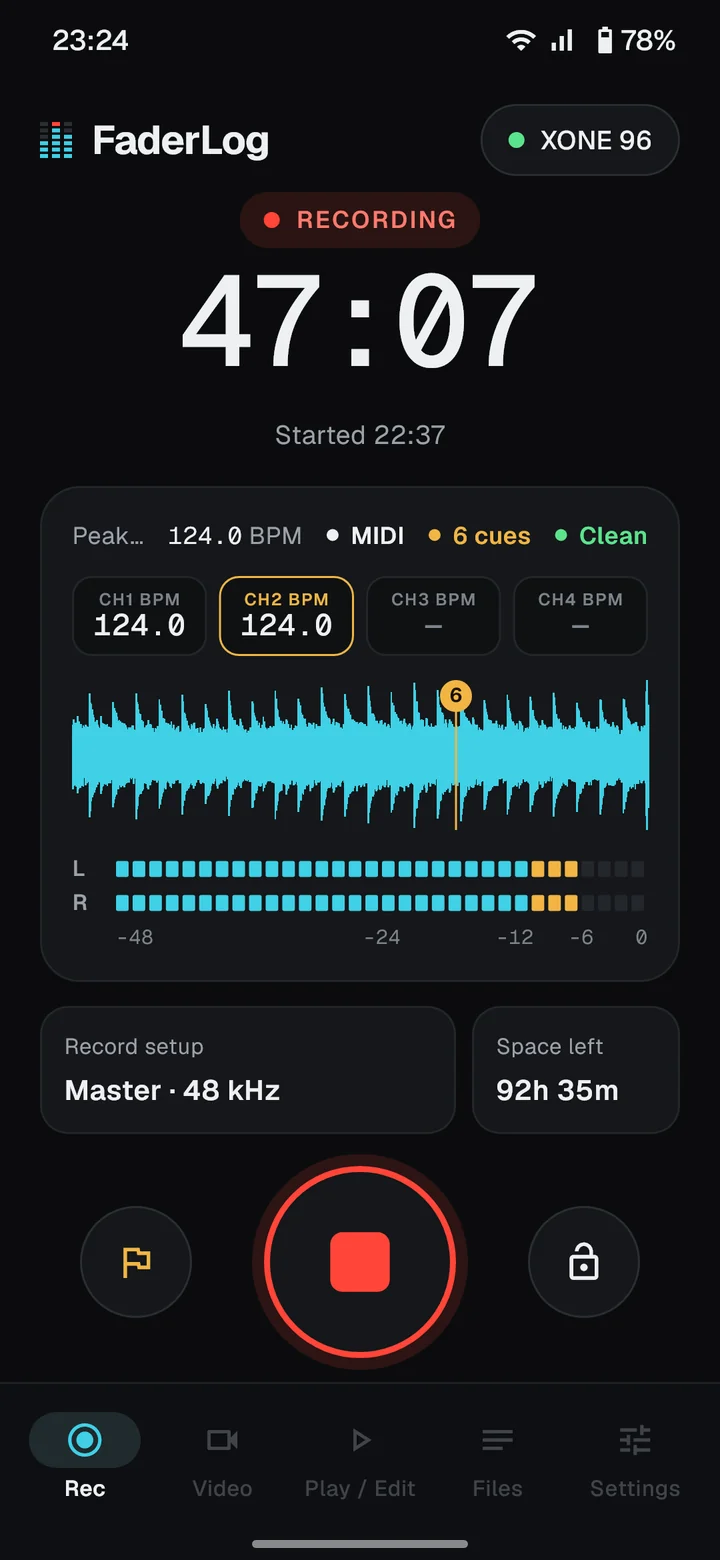
- Plug the mixer into the phone and open FaderLog. It finds the mixer and lists the stereo pairs it sends: the master, any sends, and on many mixers each channel.
- Pick Master and play something. The level meter should move. If it doesn't, the source isn't reaching the mixer's USB output; the mixer's manual shows which outputs go to USB.
- Press record. Recording carries on with the screen locked, so you can put the phone down and play.
Not every mixer with a USB port works this way. Some need a manufacturer's driver on a computer instead of standard class-compliant USB audio, and those may not show up on a phone at all. Many all-in-one controllers and standalone systems also use their USB sound card only to play audio from a computer, and send no recording feed back over USB. If yours is one of them, use way 2, which works with any mixer.
Way 2: from the REC or booth output, through an audio interface
Every DJ mixer has an analogue output you can record from: a dedicated REC output, a BOOTH output, or a second master. Connect it to a small class-compliant USB audio interface, such as a Behringer UCA202 or UMC204HD, and plug the interface into the phone. To the phone, the interface is just another USB audio device, so the recording is identical to way 1 from that point on.
This is the route for club mixers, older mixers and any mixer without USB. It adds one analogue-to-digital conversion in the interface, which at the levels of a normal recording is inaudible.
Two things to watch:
- Levels. The interface has an input gain knob. Set it so the loudest parts of the set peak well below the top of the meter, around −6 dB, never in the red.
- Power. Small interfaces often take their power from the USB cable, and some need more than a phone supplies. If the interface isn't detected or cuts out, put a powered USB hub between the phone and the interface; many hubs also charge the phone during a long set.
The step-by-step version, with cables and level settings, is in How to record from your mixer's REC or booth output.
Way 3: a standalone recorder
A portable recorder with a line input, such as a Zoom H-series or Tascam DR-series, does the same job as way 2 without the phone: run the mixer's REC output into the recorder's line input and record to its SD card.
It's a good choice if you don't want to tie up your phone, or if you already own one. The trade-offs are another device to carry, power and charge, and an extra step to move the file to your phone or computer before you can share it.
Which one should you use?
- Your mixer has USB audio: try way 1 first. It's one cable, and the recording never leaves the digital domain.
- Club mixer, older mixer, or way 1 doesn't work: way 2. A small interface works with any mixer that has an output, and you can leave it in your bag for every gig.
- You don't want the phone involved: way 3.
Getting a reliable recording
- Exclude the recorder from battery optimisation. Some phones, including many Samsung, Xiaomi and Huawei models, stop background apps to save power. In the phone's Settings → Battery, exclude the recording app so a long set isn't cut short.
- Check the storage. A stereo WAV at 48 kHz and 16-bit takes about 0.7 GB per hour, and 24-bit takes half again. FaderLog shows the time left, and stops and saves cleanly before the phone fills up.
- Do a short test before doors open. Record a minute, play it back and check both channels have sound.
- Mark the moments you'll want later. Dropping cue markers while you play makes it quick to find the good transition, or to trim the warm-up off the start.
After the set
A lossless WAV is ready to use straight away, and you can trim it at your markers and set the loudness on the phone before you share it. For streaming platforms, about −14 LUFS is a common target; for a club-loud file, closer to −9. Then send the WAV wherever it's going: cloud storage, a messenger, or your computer.
Questions
Can I record a DJ set with just my phone?
Yes, if the audio comes in over USB, either from a mixer with USB audio built in or through a small USB audio interface connected to the mixer's REC output. A cable into the phone's headset input gives a mono, distortion-prone recording, because that input is built for a microphone.
Do I need a laptop to record a DJ set?
No. A phone with a USB recording app, or a standalone recorder, captures the mixer's output just as well. A laptop is only needed if your mixer's USB audio requires a manufacturer's driver, and even then the REC output plus an interface avoids it.
Can I lock the phone while it records?
With an app built for long recordings, yes. FaderLog keeps recording with the screen off and recovers the take if the recording is interrupted.
How much storage does a DJ set take?
About 0.7 GB per hour for a 48 kHz, 16-bit stereo WAV, so a three-hour set needs a little over 2 GB.
What about recording in a DJ app on the phone?
If you mix inside a DJ app on the phone or tablet, that app's own recorder captures the mix. Apps like FaderLog are for the other case: recording external gear, a mixer or players, that you play on.